
WPC Delivery Date & Time Slots for WooCommerce

WPC Delivery Date & Time Slots is an advanced fulfillment management extension for WooCommerce that empowers online stores to offer flexible delivery scheduling at checkout. Allow customers to pick their preferred delivery date and specific time slot, while giving store owners complete control over operational capacity, lead times, cutoff schedules, and category-specific rules.
By eliminating delivery guesswork, reducing failed delivery attempts, and streamlining warehouse operations, this plugin helps deliver an exceptional post-purchase experience.
Key Features
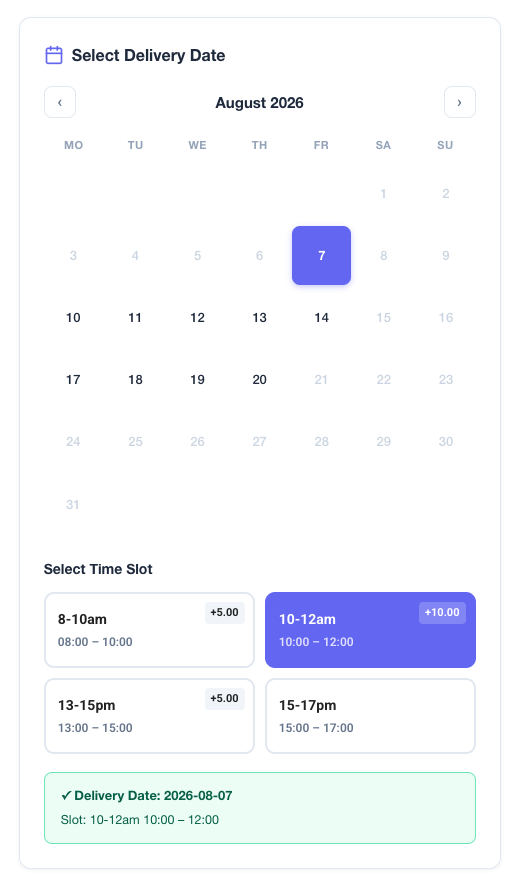
- Interactive inline calendar and time slot selector at WooCommerce checkout
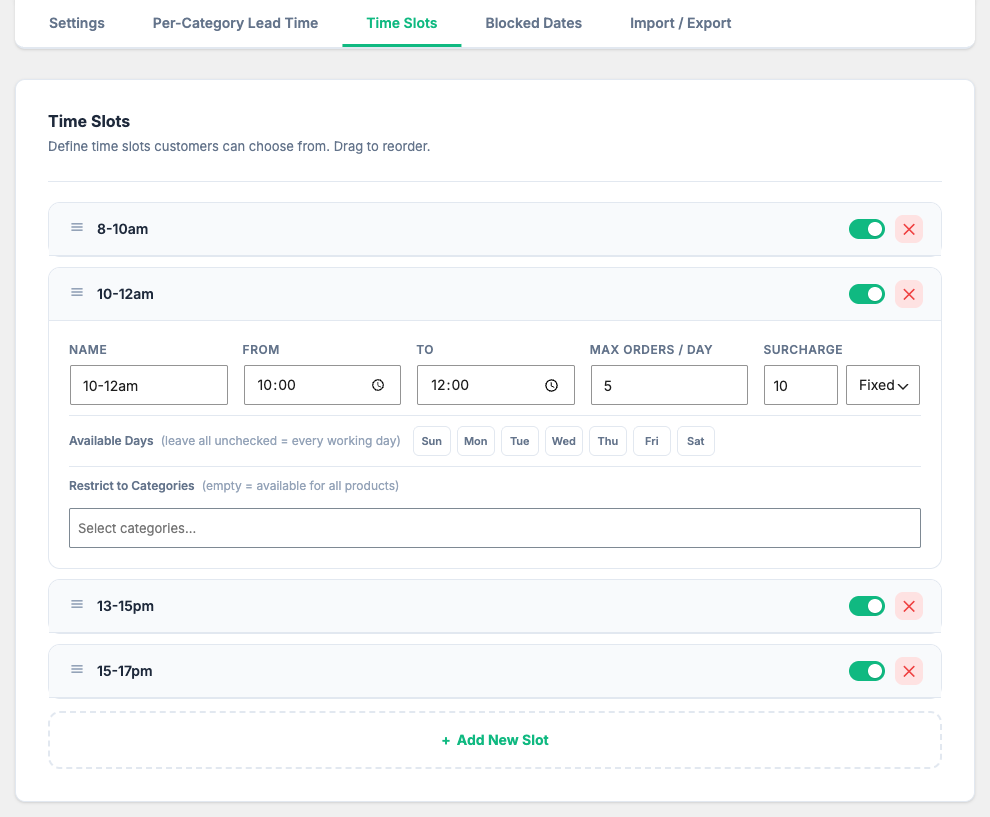
- Unlimited custom time slots per day (Morning, Afternoon, Evening, Express, etc.)
- Max orders capacity limits per calendar day and per individual time slot
- Optional time slot surcharges (fixed amount or percentage fee)
- Category-restricted time slots (restrict specific slots to products in matching categories)
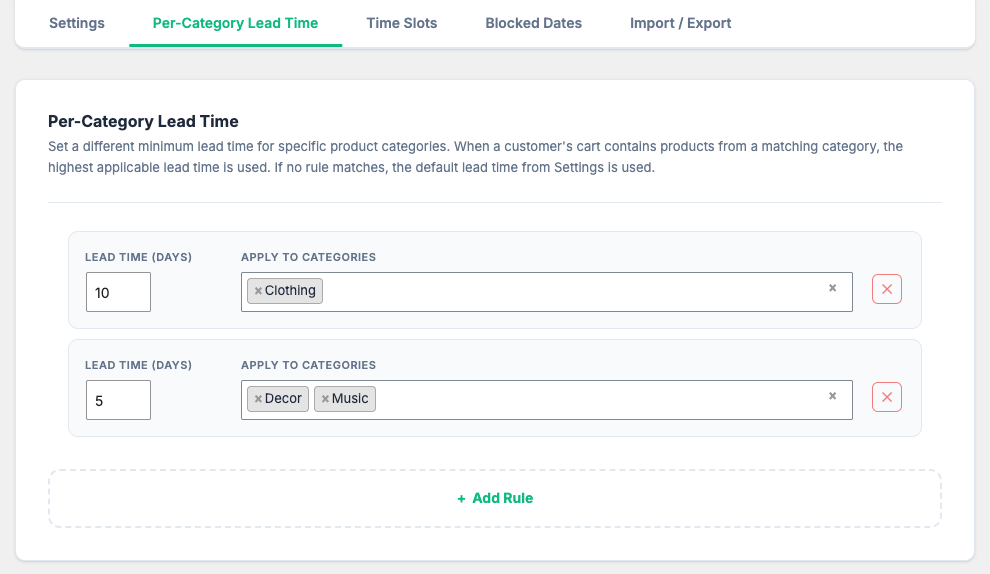
- Per-Category Lead Time rules with dynamic MAX lead time calculation for mixed carts
- Daily cutoff time with automatic extra delivery day calculation
- Configurable working days and custom blocked holiday dates
- Flexible slot display styles: Grid buttons or Dropdown select
- Manual placement via shortcode
[wpcdt_picker]or multiple automatic checkout positions - Urgency Countdown Banner: "Order within X hours for delivery on [date]"
- Customer Rescheduling Portal in My Account with attempt limits and status rules
- Automatic email notifications: Delivery Reminder and Admin Date Changed alerts
- Admin order management: Column in order list, sidebar meta box, and complete change log
- High-Performance Order Storage (HPOS) compatible
- 5 REST API endpoints for headless and mobile app integrations
- Native integration with WPC Estimated Delivery Date (wpced)
- One-click JSON Import / Export for easy site migration
📅 Dynamic Date & Calendar Rules
Take full command over when orders can be delivered based on your operational calendar and fulfillment capabilities.
- Minimum Lead Time: Set a default lead time (e.g., 0 days for same-day, 1 day for next-day) to ensure your fulfillment team has sufficient time to prepare orders before the earliest delivery date is offered.
- Maximum Days Ahead: Limit how far into the future customers can book delivery dates (e.g., up to 30 days ahead) to keep scheduling predictable.
- Daily Cutoff Time: Automatically enforce next-day processing for orders placed past a specified hour (e.g., 16:00). Orders placed after the cutoff time dynamically push the earliest available delivery date by +1 day.
- Working Days: Toggle active fulfillment days (e.g., Monday through Friday) so customers can only select days when your delivery fleet is operating.
- Blocked Dates & Holidays: Easily block specific calendar dates (such as Christmas, New Year's Day, or custom warehouse maintenance days) with custom labels explaining the closure to shoppers.
⏰ Time Slots & Capacity Management
Organize your delivery schedule into precise time windows while preventing overload on your delivery team.
- Custom Time Slots: Define unlimited time slots per day with custom start/end times and human-readable names (e.g., "Morning Delivery (08:00 – 12:00)", "Evening Express (18:00 – 21:00)").
- Individual Slot Capacity: Set maximum order quotas per time slot. Once a slot reaches its booking capacity, it automatically locks and displays as "Full" on checkout.
- Day-Level Capacity: Establish a total daily order cap across all time slots combined to ensure your entire store never exceeds daily fulfillment volume.
- Slot Surcharges: Monetize premium delivery options by adding extra fees (fixed monetary amount or percentage of cart subtotal) to specific high-demand time slots.
- Restrict to Categories: Restrict specific time slots so they only appear when items from designated WooCommerce categories are present in the cart.
⚡ Per-Category Lead Time & Cutoff Rules
Handle complex multi-category catalogs effortlessly with intelligent lead time logic.
- Category Rule Builder: Assign custom lead times to specific product categories (e.g., 1 day for Standard Goods, 3 days for Fresh Bakery, 5 days for Custom Furniture).
- Smart Cart Evaluation: When a cart contains items from multiple categories, the plugin automatically evaluates all matching rules and applies the MAX lead time to guarantee every item in the order has enough time to be prepared.
- Multi-Category Selector: Uses a fast, searchable
selectWoocategory dropdown supporting catalog stores with over 100+ categories.
🔄 Customer Rescheduling Portal & Email Notifications
Reduce customer support inquiries by providing self-service delivery rescheduling and automated email reminders.
- My Account Reschedule Portal: Allow customers to view and reschedule their delivery date directly from their WooCommerce account dashboard.
- Reschedule Controls: Set maximum allowed reschedule attempts per order (e.g., max 2 times) and minimum days in advance required before a delivery date can be changed.
- Allowed Order Statuses: Specify which order statuses (e.g., Processing, On Hold) permit rescheduling.
- Delivery Reminder Email: Automatically send scheduled reminder emails to customers X days before their scheduled delivery date via WP Cron.
- Date Change Notifications: Send instant notification emails to customers when an administrator modifies their order's delivery date from the WooCommerce backend.
⚙️ Checkout Display & Placement Flexibility
Seamlessly blend the date picker into your WooCommerce checkout design.
- Slot Display Style: Choose between interactive Grid buttons or a clean, space-saving Dropdown select menu.
- Checkout Positions: Position the date picker automatically before payment methods, before/after order notes, before customer details, or select None for manual placement.
- Shortcode Support: Use
[wpcdt_picker](or[wpcdt_delivery_picker]) to embed the delivery date and time slot selector anywhere on custom checkout pages, Gutenberg blocks, or Elementor templates. - Countdown Urgency Banner: Display a dynamic countdown timer banner (e.g., "Order within 02:45:10 for delivery on Friday, Dec 12") to boost checkout conversions.
📊 Import/Export & Headless REST API
Enterprise-ready tools for developers and multi-environment site management.
- JSON Import / Export: Export all delivery rules, time slots, and blocked dates to a JSON file and import them into staging or production with a single click.
- REST API Endpoints: Build custom mobile apps or headless WooCommerce frontends with 5 dedicated API endpoints:
GET /wpcdt/v1/available-dates— retrieve list of valid delivery datesGET /wpcdt/v1/available-slots?date=Y-m-d— retrieve available slots for a dateGET /wpcdt/v1/slot-capacity?date=Y-m-d&slot_id=xxx— check slot capacity statusGET /wpcdt/v1/orders/by-date?date=Y-m-d— list orders scheduled for a specific date (Admin)POST /wpcdt/v1/orders/{id}/delivery— update an order's delivery date and slot (Admin)
💡 Common Use Cases
Below are real-world scenarios store owners commonly solve with this plugin.
Delivery Scheduling & Calendar
1. Same-day delivery with afternoon cutoff
Set Minimum Lead Time to 0 days, Working Days to Mon–Sat, and Daily Cutoff Time to 12:00 PM. Customers ordering before noon can pick today's date, while customers ordering past noon are automatically offered tomorrow as the earliest date.
2. Excluding weekend deliveries
Uncheck Saturday and Sunday in Working Days so the calendar automatically greys out weekends and prevents delivery bookings when your fulfillment center is closed.
3. Holiday closures and blackout dates
Add holiday blackout dates (e.g., 2026-12-25 labeled "Christmas Day" or 2026-01-01 labeled "New Year's Day") in Blocked Dates to prevent customers from selecting dates when staff is off.
Time Slot Capacity & Surcharges
4. Morning vs Evening delivery slots with capacity limits
Create two slots: "Morning (08:00 – 12:00)" with Max Bookings = 15 and "Evening (17:00 – 20:00)" with Max Bookings = 10. Once 15 morning orders are placed for a date, the morning slot automatically turns "Full" and locks out further bookings.
5. Express delivery surcharge
Offer a "Same-Day Express Slot" with an additional $10.00 or 15% surcharge fee. The extra fee is automatically added to the order total during checkout.
6. Cold storage / Chilled goods slot restriction
Restrict the "Refrigerated Transport Slot" to only display when products from the "Frozen Foods" or "Perishables" category are added to the cart.
Per-Category Lead Time & Cutoff
7. Mixed cart lead time calculation
Assign a 1-day lead time to "Standard Items" and a 4-day lead time to "Custom Engraved Gifts". When a customer buys both items in a single order, the system applies the 4-day lead time so the custom gift can be crafted in time.
Customer Rescheduling & Notifications
8. Self-service rescheduling from My Account
Enable Customer Rescheduling with Max Attempts = 2 and Min Days Before = 1. Customers can change their delivery date up to 24 hours before the scheduled date without contacting customer support.
9. Automated delivery reminder email
Enable Delivery Reminder Email with Reminder Days = 1. The plugin automatically sends an email to the customer 24 hours before their scheduled delivery date reminding them to be home.
🧩 Integration & Compatibility
- WPC Estimated Delivery Date (wpced): When both plugins are active, wpcdt seamlessly syncs with wpced to override estimated dates with the customer's explicitly chosen delivery date.
- High-Performance Order Storage (HPOS): Fully compatible with WooCommerce HPOS (
custom_orders_table) for lightning-fast database performance. - WooCommerce Subscriptions & Block Checkout: Works reliably with standard WooCommerce checkout flows and custom checkout builders.
Onetime purchase - Lifetime update
1-year premium support
7-Day Money-Back Guarantee
After successful payment, the installation file will be immediately sent to your purchase email.
If you have any pre-sale questions, feel free to contact us.
Related Downloads