
WPC Multi Currency for WooCommerce

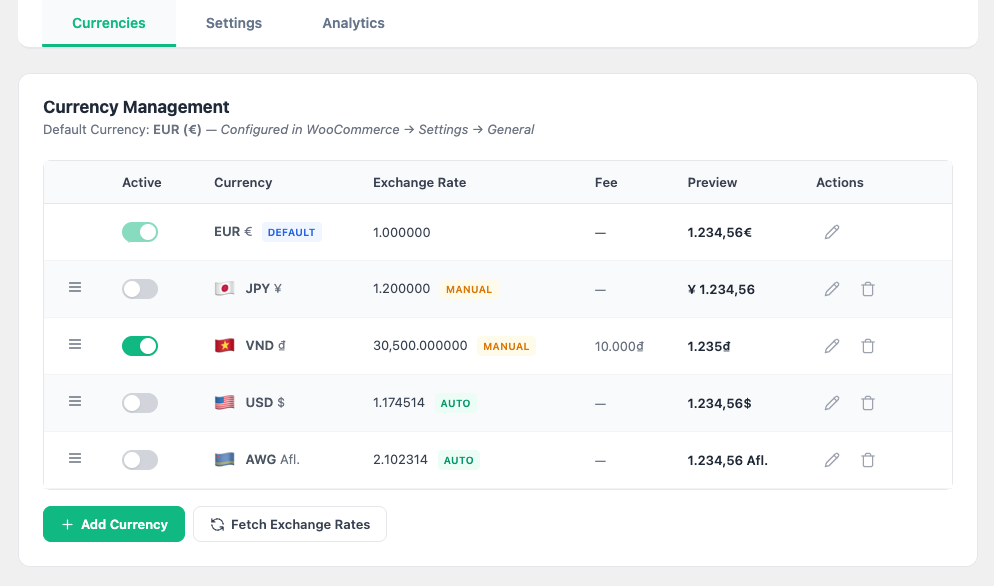
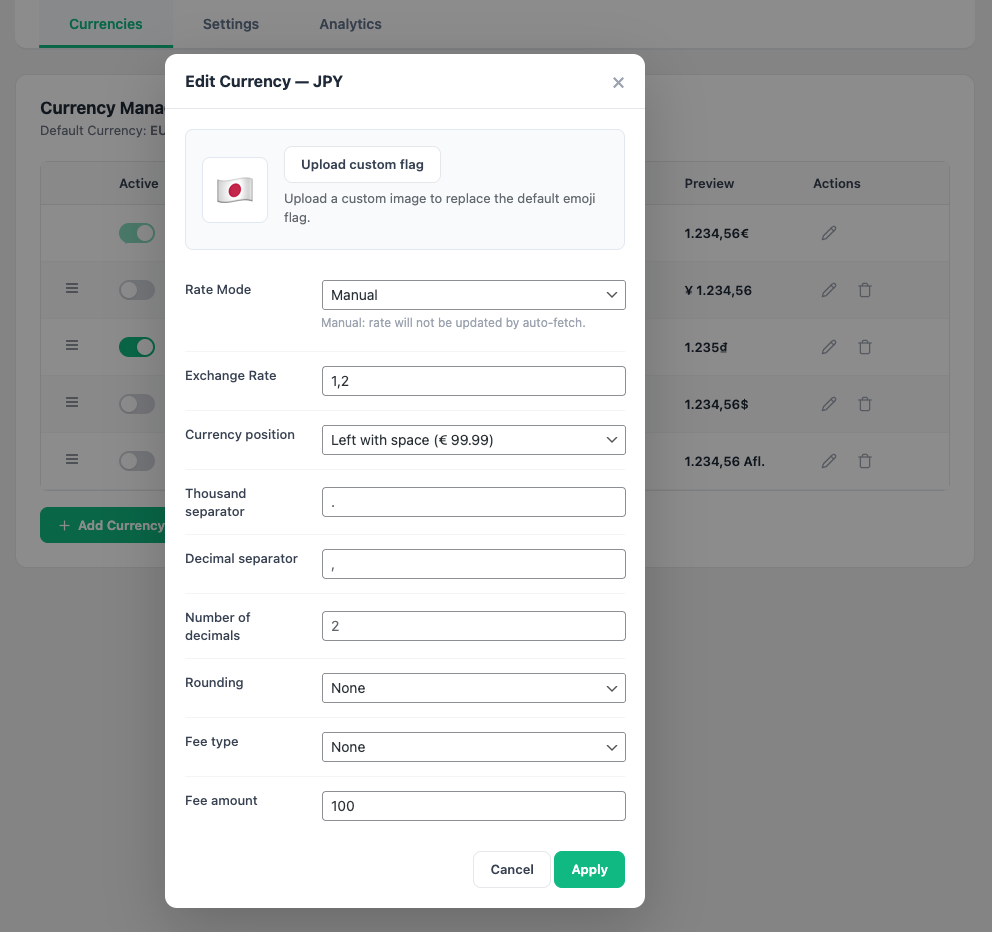
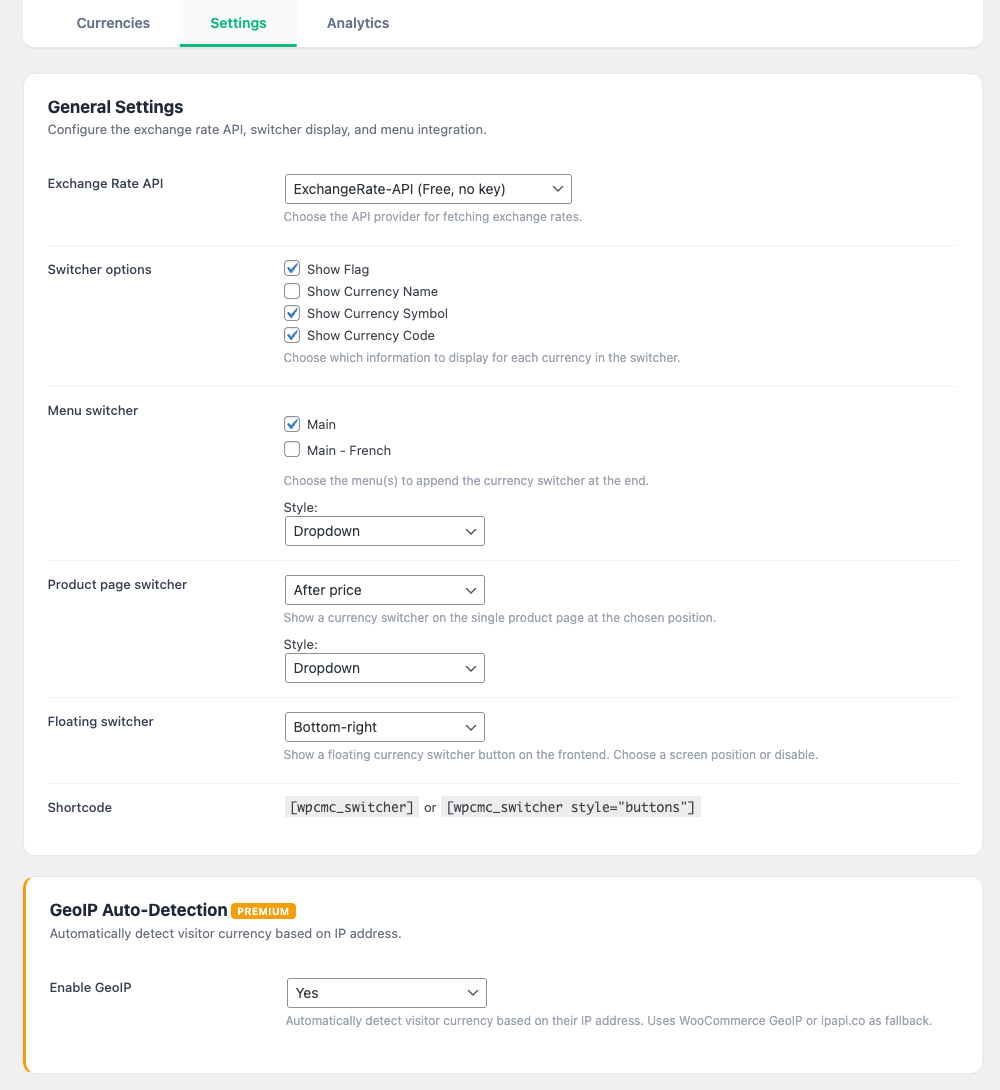
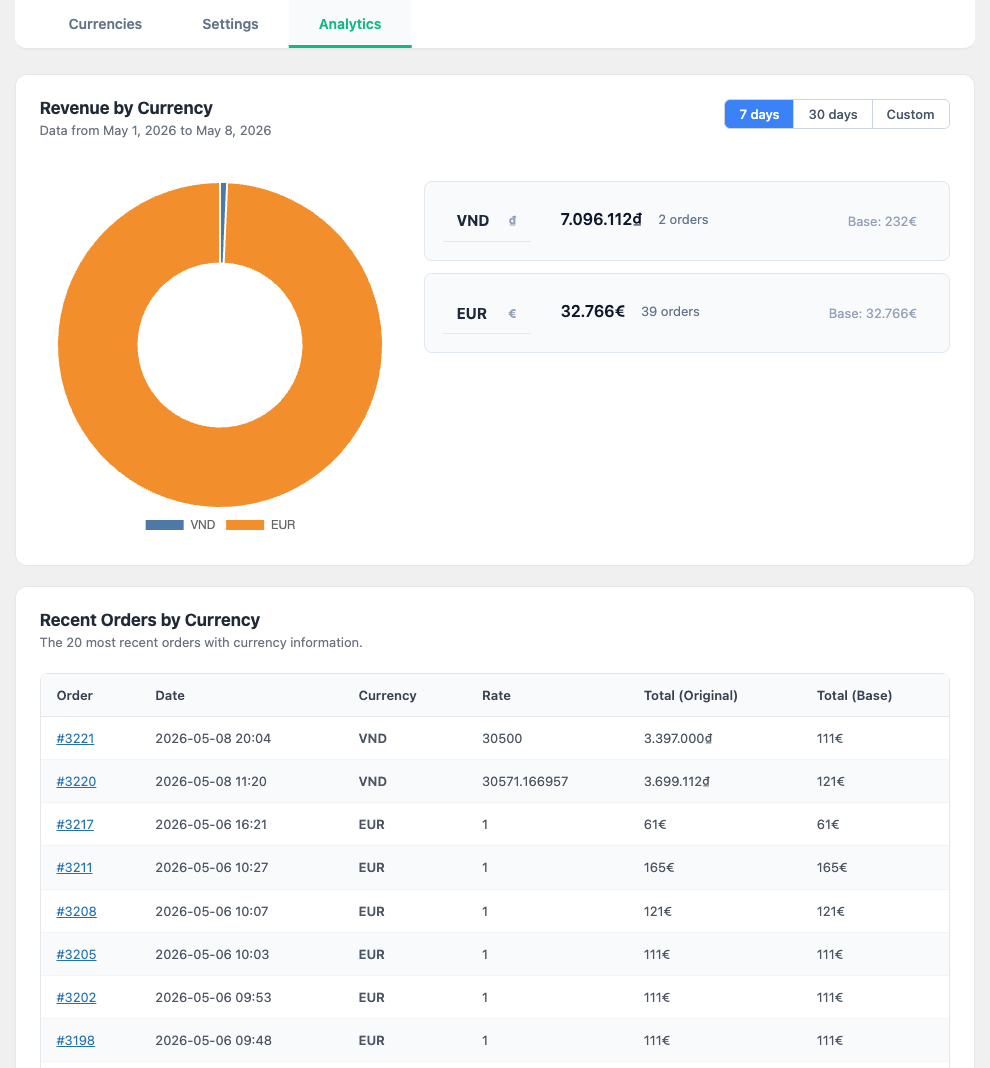
WPC Multi Currency for WooCommerce is a feature-rich currency conversion and switching system designed for global WooCommerce stores. Whether you sell to a handful of countries or worldwide, this plugin gives your customers the freedom to shop in the currency they know and trust — boosting conversion rates and reducing cart abandonment.
Instead of forcing visitors to manually calculate prices, WPC Multi Currency handles everything seamlessly: real-time exchange rates, automatic price conversion, smart psychological pricing, and a variety of beautiful switcher components that blend into any theme.
Why WPC Multi Currency?
- Multiple Exchange Rate APIs — choose from ExchangeRate-API, Fixer.io, or CurrencyFreaks with automatic scheduled updates.
- Smart Psychological Pricing — built-in charm rounding (e.g., .99, .95, end-in-9, round thousands) for professional, conversion-optimized prices.
- Dual Price Display — show the converted price alongside the original base price for full transparency.
- Deep WPC Integration — works seamlessly with WPC Product Bundles, WPC Composite Products, WPC Smart Wishlist, and other WPC plugins.
- Enterprise Caching — intelligent cache busting for WP Rocket, LiteSpeed, W3 Total Cache, and more. No stale prices, ever.
- Developer Ready — REST API endpoints, 10+ public helper functions, and extensive filter hooks for custom integrations.
Key Features
- Unlimited currencies with individual exchange rates, symbols, and formatting
- Automatic exchange rate updates via ExchangeRate-API, Fixer.io, or CurrencyFreaks
- Scheduled rate updates (hourly, twice daily, daily, weekly)
- Manual rate override for full control
- Conversion fee support (percentage or fixed amount per currency)
- Smart price rounding: nearest 1/10/100/1000, Charm .99, Charm .95, End-in-9, Round thousands
- Dual price display (show original price alongside converted price)
- Fixed price per product per currency (override auto-conversion)
- Custom dropdown switcher with flag support (emoji or custom image)
- Button-style switcher option
- Menu switcher — append to any WordPress navigation menu
- Product page switcher — show on single product pages at configurable positions
- Floating switcher — fixed-position FAB button with 6 placement options
- Currency-specific Payment Gateway restrictions
- Currency-specific Shipping Method restrictions
- GeoIP auto-detection — automatically switch currency based on visitor location
- Order emails display in the customer's selected currency
- WooCommerce Widget for sidebar placement
- WPML and Polylang integration for multilingual stores
- REST API for headless and mobile app integrations
- Public PHP functions for third-party plugin developers
- Intelligent cache compatibility (WP Rocket, LiteSpeed, W3TC, WP Super Cache, SG Optimizer, and more)
- Cart fragment cache busting for real-time mini-cart updates
- High-Performance Order Storage (HPOS) compatible
- Translation ready
💱 Automatic Exchange Rates
Stop manually updating exchange rates. WPC Multi Currency connects to leading rate providers and keeps your prices accurate around the clock.
Supported Providers
- ExchangeRate-API — free tier available, no API key required
- Fixer.io — trusted by 170,000+ companies worldwide
- CurrencyFreaks — real-time and historical rates
Scheduled Updates
Configure automatic rate updates on your preferred schedule: every hour, twice daily, daily, or weekly. Rates are fetched in the background via WP-Cron — your visitors never see a delay.
Manual Override
Need full control? Set a fixed exchange rate for any currency and the auto-updater will leave it untouched. Mix and match: use auto rates for USD/EUR and manual rates for niche currencies.
🧠 Smart Psychological Pricing
Raw currency conversions often produce ugly numbers like $23.4712 or ₫587,342. Smart rounding transforms these into prices that feel natural and drive conversions.
Available Rounding Modes
- Nearest 1 / 10 / 100 / 1000 — standard mathematical rounding
- Charm .99 — the classic $29.99 ending that signals a deal
- Charm .95 — a softer alternative preferred in luxury markets
- End in 9 — rounds to the nearest integer ending in 9 (e.g., $229)
- Charm .000 — rounds to the nearest thousand, perfect for VND, IDR, KRW
Each currency can have its own rounding rule. So you might use Charm .99 for USD, Charm .95 for EUR, and Charm .000 for VND — all from the same base price.
🏷️ Dual Price Display
Build customer trust by showing both the converted price and the original store price side by side.
When enabled, a subtle secondary price appears below the converted price on product pages:
₫730,000 (≈ $29.99)
This transparency reassures international shoppers that the conversion is fair, reducing bounce rates and support tickets. The original price inherits the base currency's formatting (symbol position, decimal separator, thousands separator) automatically.
🔄 Flexible Switcher Components
Give customers multiple ways to change their currency, each customizable to match your theme.
Menu Switcher
Append a currency switcher to any WordPress navigation menu. Choose between a compact dropdown or inline buttons. Configure which menus to target — primary, footer, or both.
Product Page Switcher
Place a switcher directly on the single product page at one of 7 positions: before/after the title, before/after the price, before/after the add-to-cart button, or after the product meta. Choose dropdown or button style independently.
Floating Switcher
A fixed-position FAB (Floating Action Button) that stays visible as customers scroll. Pick from 6 positions: top-left, middle-left, bottom-left, top-right, middle-right, or bottom-right. The panel opens with a smooth scale animation and lists all currencies with flags, codes, symbols, and checkmarks.
Widget & Shortcode
Use [wpcmc_switcher] or [wpcmc_switcher style="buttons"] anywhere. A dedicated WooCommerce Widget is also available for sidebar placement.
Custom Flags
Upload custom flag images via the WordPress Media Library, or fall back to emoji flags. Flags appear consistently across all switcher types — menu, product page, floating, and shortcode.
💳 Currency-Specific Rules
Control which payment gateways and shipping methods are available for each currency.
Payment Gateway per Currency
Restrict payment gateways based on the selected currency at checkout. For example, allow PayPal only for USD and EUR, while enabling local bank transfer for VND. Leave a currency unconfigured to allow all gateways.
Shipping Method per Currency
Restrict shipping methods per currency. The plugin scans all WooCommerce Shipping Zones (including "Rest of the World") and lets you pick which methods are available for each currency using a searchable multi-select powered by SelectWoo.
📧 Order Email Currency
Order confirmation emails automatically display prices in the currency the customer selected at checkout. No extra configuration needed — the plugin reads the saved order meta (_wpcmc_currency, _wpcmc_rate) and temporarily overrides WooCommerce's currency formatting during email rendering.
This ensures your customers see familiar numbers in their inbox, not confusing base-currency amounts.
🌍 GeoIP Auto-Detection
Automatically detect your visitor's country using IP geolocation and switch to the appropriate currency before they even interact with your store. Supports MaxMind GeoLite2 and WooCommerce's built-in GeoIP database.
Visitors can always override the auto-detected currency using any switcher component. Their choice is saved in a cookie for 30 days.
🧑💻 Developer API & Extensibility
Build headless storefronts, mobile apps, or custom integrations with our comprehensive API layer.
REST API Endpoints
GET /wp-json/wpcmc/v1/currencies— list all active currencies with rates, symbols, and formattingGET /wp-json/wpcmc/v1/rates— exchange rates with optional?base=EURre-basingGET /wp-json/wpcmc/v1/convert— convert any amount between currencies with roundingGET /wp-json/wpcmc/v1/settings— admin-only settings dump
WooCommerce Product API Extension
Every product in the WC REST API includes a wpcmc_prices field with per-currency prices, indicating whether each price is auto-converted or manually fixed.
Public PHP Functions
wpcmc_get_current_currency()— get the active currency codewpcmc_get_default_currency()— get the store's base currencywpcmc_convert_price( $price, $currency )— convert and round a pricewpcmc_format_price( $price, $currency )— convert and format with symbolwpcmc_is_custom_currency()— check if visitor is using a non-default currencywpcmc_get_rate( $currency )— get the exchange ratewpcmc_get_active_currencies()— list all active currencies- And more — all wrapped in
function_exists()for safe usage.
⚡ Enterprise Caching Compatibility
Multi-currency and page caching are notoriously difficult to combine. WPC Multi Currency solves this with intelligent, per-plugin cache integration.
- WP Rocket — mandatory + dynamic cookie registration
- LiteSpeed Cache — Vary cookie registration
- W3 Total Cache — .htaccess cookie-based cache variation
- WP Super Cache — accepted cookies list
- SG Optimizer — Vary header integration
- Comet Cache / ZenCache — WooCommerce cookie consideration
- WC Cart Fragments — cart hash and fragment group key vary by currency
- Fallback —
DONOTCACHEPAGE+nocache_headers()for unknown setups
Onetime purchase - Lifetime update
1-year premium support
7-Day Money-Back Guarantee
After successful payment, the installation file will be immediately sent to your purchase email.
If you have any pre-sale questions, feel free to contact us.
Related Downloads