WPC Smart Fees for WooCommerce

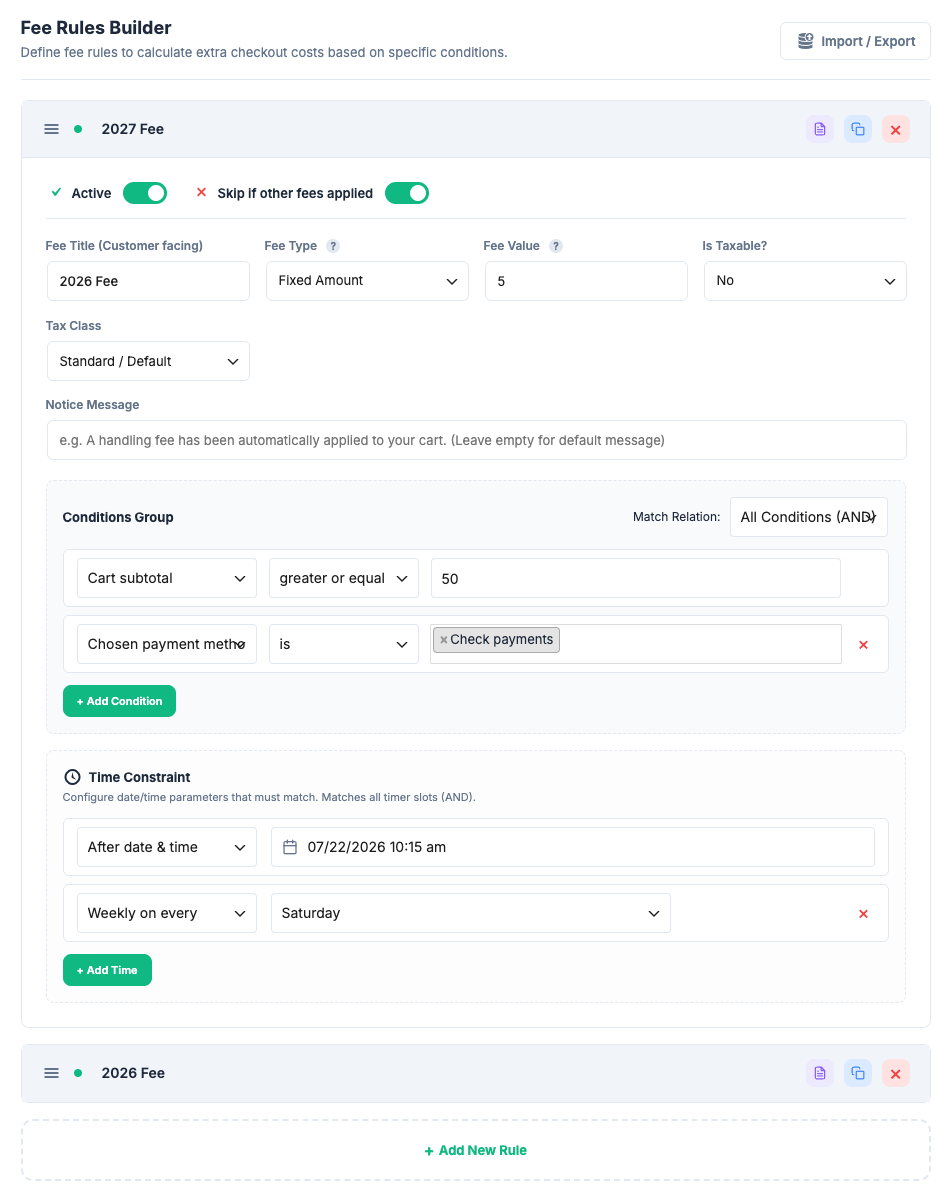
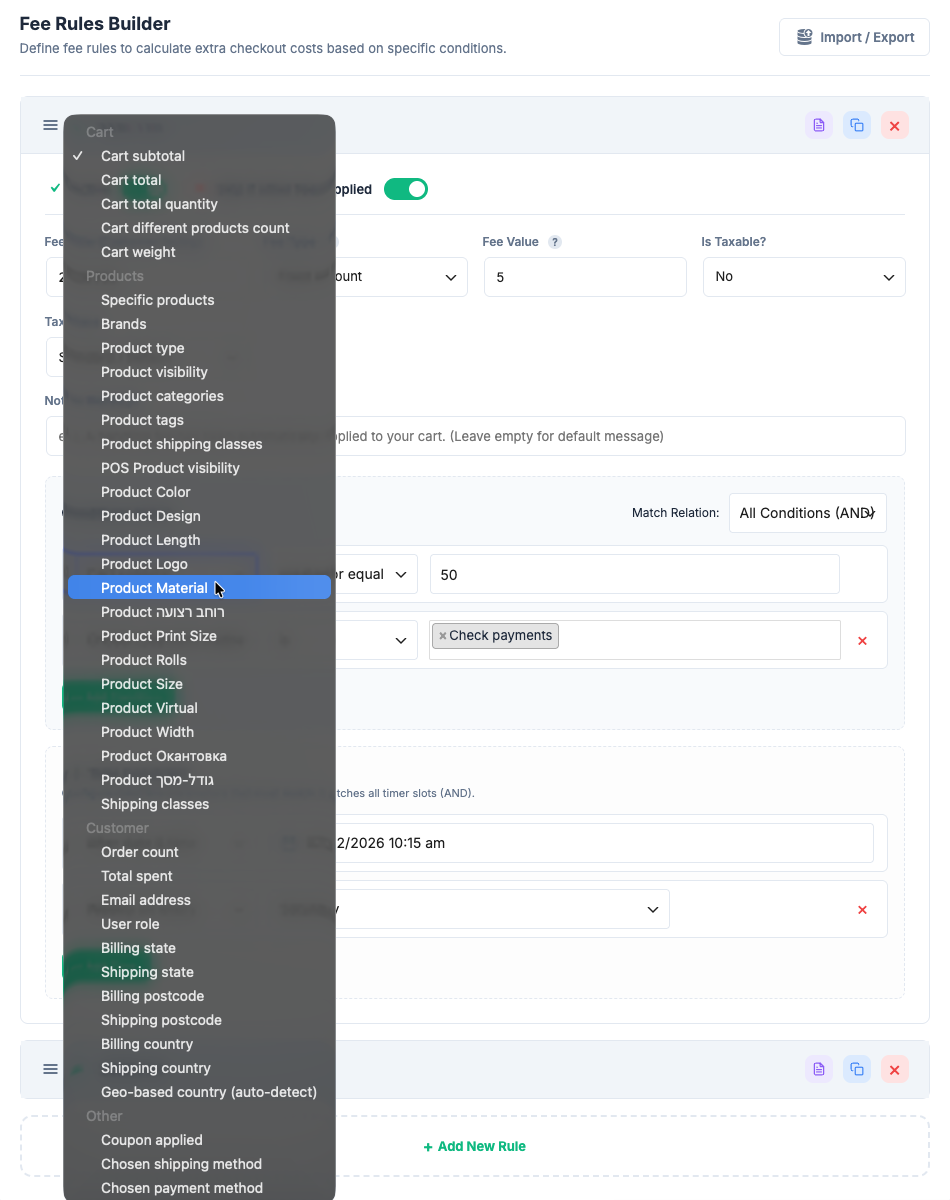
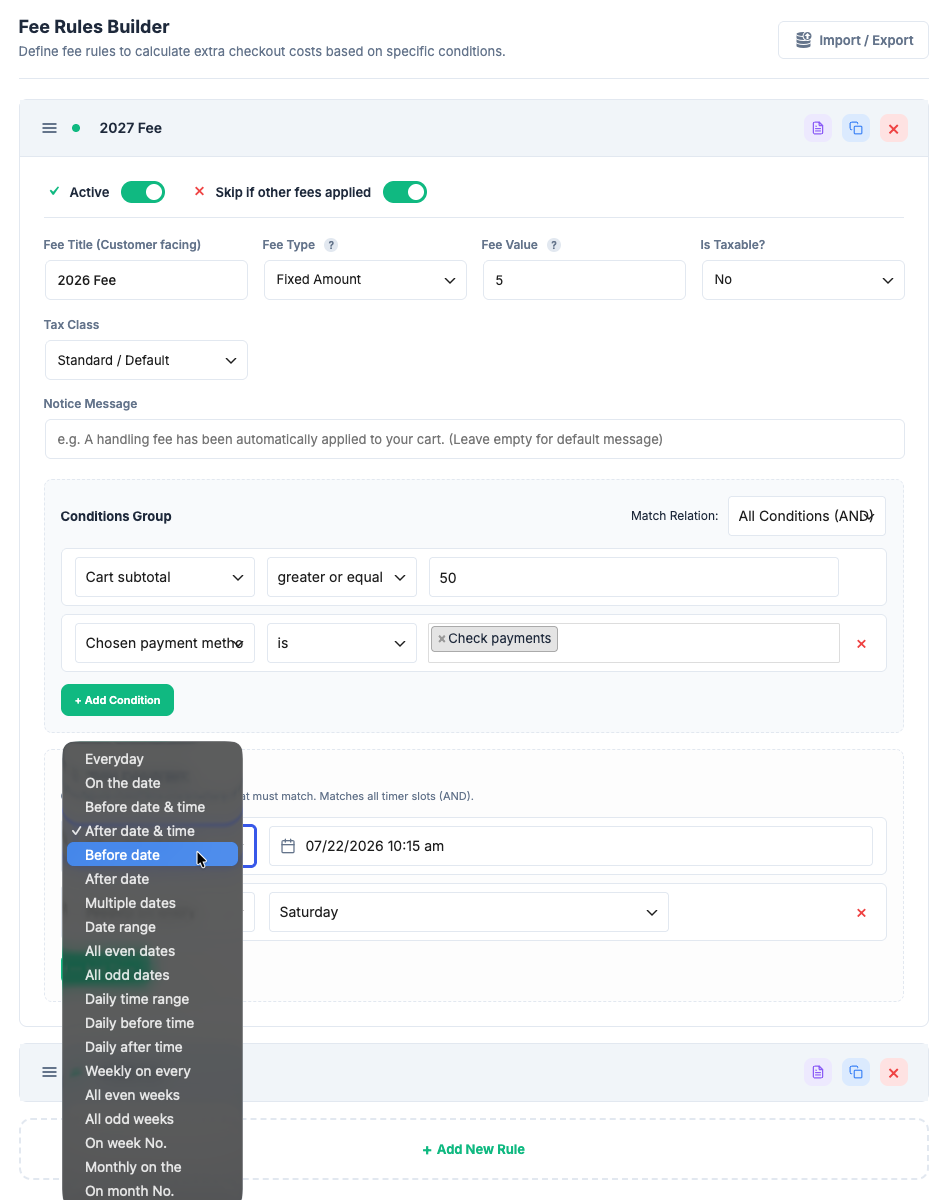
WPC Smart Fees for WooCommerce is a powerful extension that allows store owners to automatically apply dynamic, rule-based fees to the shopping cart at checkout. From payment surcharges and handling fees to location-based charges and time-sensitive rates, the plugin gives you complete control over your pricing logic without writing a single line of code.
Whether you need to add a credit card processing fee, a small-order handling charge, a cold-chain surcharge for perishable goods, or a discount for specific customer segments, WPC Smart Fees makes it effortless to build, test, and manage these rules through a modern admin interface.
Key Features
- Add unlimited conditional fee rules to the WooCommerce cart
- Support for fixed amount and percentage-based fees
- Support for negative fees (automatic discounts) with cart-protection: total never goes below zero
- Fine-grained conditions: cart total, subtotal, quantity, weight, distinct products count
- Product conditions: specific products, categories, tags, shipping classes
- Customer conditions: order count, total spent, user role, email address, logged-in status
- Geographic conditions: billing/shipping country, state, postcode, and IP-based Geo-location
- Coupon conditions: apply or skip fees when specific coupons are used
- Shipping-based conditions: restrict fees to specific chosen shipping methods
- Time-based rules: apply fees during specific dates, days of the week, time ranges, and date ranges
- Taxable fee option: mark each fee as taxable or non-taxable independently
- Skip if other fees applied: prevent fee stacking with a single toggle
- Skip if other fees applied: prevent fee stacking with a single toggle
- Custom customer-facing notices: display informative messages alongside each fee
- Import/Export: migrate rules between environments via JSON in one click
- Modern UI: card-based rules with accordion panels, inline editing, quick-action icons
- Rule summary modal: at-a-glance view of every rule's configuration
- Duplicate rules: clone any rule to create variations in seconds
- Rule Hits (Premium): see how many times each fee rule was applied over the past 7 days, directly on the rule header
- Simulator (Premium): test any checkout scenario against your fee rules in real time — no real orders, no cart modifications required
⚙️ Flexible Fee Configuration
Each fee rule is a self-contained unit with its own amount, type, tax status, and condition set. You can create as many rules as needed and they are evaluated independently on every cart update.
Fee Types
- Fixed Amount — Add an exact dollar/euro/currency amount. E.g., $3.99 small-order fee.
- Percentage — Charge a percentage of the cart subtotal or total. E.g., 2.5% payment processing surcharge. Negative percentages are also supported (percentage-based discounts).
Negative Fees (Automatic Discounts)
Enter a negative value in any fee rule to apply an automatic discount to the cart. The plugin includes a built-in cart-protection algorithm: after all fees are calculated, the sum of all fees is clamped so the cart total can never drop below zero, preventing oversized discounts from creating negative totals.
Taxable Fees
Each fee can be marked taxable independently. Taxable fees integrate natively with WooCommerce's tax system and respect your store's tax rules, rates, and display settings.
Skip if Other Fees Applied
A simple toggle on each rule prevents unwanted fee stacking. When enabled, the rule will be silently skipped if any other fee has already been added during the current cart calculation pass.
Custom Notices
Optionally attach a custom customer-facing message to each fee. The notice is displayed as a WooCommerce cart notice when the fee is applied, giving shoppers clear transparency about any extra charges.
🎯 Powerful Condition Engine
The plugin is powered by a highly extensible Condition Engine that evaluates complex logic instantly on every cart update.
Versatile Condition Sets
- Mix and match multiple conditions using AND (All must match) or OR (Any can match) relations.
- Utilize advanced comparison operators: Equal, Not Equal, Greater Than, Less Than, Greater Than or Equal, Less Than or Equal, Multiple Of, Contains, and more.
- Support for Tags: input multiple product IDs, postcodes, email domains, or coupon codes as comma-separated values.
Available Condition Types
Cart Conditions: Subtotal, Total, Item Count, Total Quantity, Weight, Distinct Products Count
Product Conditions: Specific Product (by ID), Category, Tag, Shipping Class
Customer Conditions: User Role, Order Count, Total Spent, Email Address, Logged-in Status
Geographic Conditions: Billing Country, Billing State, Billing Postcode, Shipping Country, Shipping State, Shipping Postcode, IP Geo-location Country
Checkout Conditions: Applied Coupon, Chosen Shipping Method, Chosen Payment Method
Time Conditions: Specific Date, Before/After Date, Date Range, Multiple Dates, Even/Odd Dates, Day of Week, Week Number, Even/Odd Weeks, Monthly Day, Month Number, Daily Time Range, Before/After Time
Time-Based Rules
Define precise date and time windows for each fee rule. Add a rush-hour surcharge only between 5–7 PM, apply a weekend handling fee every Saturday and Sunday, or automatically stop charging a seasonal fee after a specific date — all without touching any code.
🌍 Advanced Geographic & Customer Targeting
Deliver highly tailored pricing based on who the customer is and where they are located.
- Customer Loyalty: Reward long-term customers by waiving fees based on their past Order Count or Total Spent.
- IP Geo-location: Automatically detect a customer's country from their IP address before they fill out the billing form, enabling location-based fees from the moment they visit the cart.
- Granular Area Targeting: Target down to the state or postcode level using exact matches, wildcard patterns (e.g.,
SW1*), or comma-separated tag lists. - Role-based Pricing: Apply or exempt fees entirely based on WordPress user role — show wholesale prices to B2B customers, charge retail surcharges to guests.
📦 Import / Export
Moving your fee configuration between a staging environment and your live site has never been easier. The built-in Import/Export utility serializes all rules into a portable JSON document. Export from staging in one click, import into production in another. The importer validates the JSON structure before applying changes, and displays a count of successfully imported rules upon completion.
🎨 Modern Admin Interface
The plugin was designed from the ground up to feel as premium as the stores it powers.
- Card-based rules with clear headers showing the rule name, status badge, and quick-action icons.
- Accordion panels keep the interface tidy — expand only the rules you need to edit.
- Inline rule naming with click-to-edit rule titles directly on the card header.
- Summary Modal — click the summary icon on any rule card to see a full at-a-glance overview of its fee details, active/skip status, conditions, and time restrictions — without opening the full accordion.
- Duplicate any rule in one click. The clone is instantly created with "(Duplicated)" appended to the name so you can modify it without confusion.
- Drag-to-reorder rules using the sort handle to control evaluation priority.
- Datepicker inputs with intuitive calendar and clock icons, powered by wpcdpk.
- SelectWoo dropdowns for multi-value conditions like products, categories, and countries — with AJAX search support.
💡 Common Use Cases
Below are real-world scenarios store owners commonly solve with this plugin.
Surcharges & Processing Fees
1. Credit card processing surcharge
Add a 2.5% fee when the chosen payment method is a credit card gateway (e.g., Stripe, PayPal). Offset transaction costs without changing your product prices.
2. Small-order handling fee
Add a fixed $4.99 fee when the cart subtotal is less than $25. Encourages customers to reach the minimum threshold, and optionally add a notice: "Add $X more to waive the handling fee!"
3. Rush order surcharge
Add a $15 rush-processing fee when the chosen shipping method is "Express Delivery" or "Next Day". Recover the extra fulfillment cost automatically.
4. Bulky/oversize item fee
Add a $20 oversized-item surcharge when the cart contains products from the "Oversized" shipping class or the total cart weight exceeds 30 kg.
5. Cold-chain packaging fee
Add a $5 temperature-controlled packaging fee when the cart contains products tagged "Perishable" or from the "Fresh Food" category.
Discounts & Negative Fees
6. Loyalty discount for repeat customers
Apply a -$5 automatic discount when the customer's order count is greater than 10. Reward loyal buyers without managing coupons.
7. Wholesale pricing discount
Apply a -10% fee for customers with the "Wholesale" user role, giving them a transparent cart-level discount on every order.
8. First-time customer discount
Apply a -$3 welcome discount when the customer's order count equals 0 (first purchase). Reduce friction for new buyers.
Geographic & Location-based
9. Remote area surcharge
Add a $12 remote delivery fee when the shipping postcode matches patterns like 89* or 96* (remote US ZIP codes).
10. International handling fee
Add a $8 export handling fee when the shipping country is NOT equal to your home country.
11. Regional compliance surcharge
Add a $2 regulatory compliance fee when the billing state matches specific regulated markets (e.g., California Prop 65 compliance packaging).
Time-Sensitive Fees
12. Weekend surcharge
Add a $5 weekend processing fee on every Saturday and Sunday, since your warehouse operates on reduced capacity.
13. Peak-hour delivery surcharge
Add a $3 rush delivery fee during the daily time range 17:00–19:00, applied automatically without any manual toggles.
14. Seasonal holiday fee
Add a $10 peak-season handling fee during the date range December 20 – January 5, when carrier surcharges increase your fulfillment cost.
15. Flash sale free-shipping offset
Apply a -$5 discount on every even-numbered date during a flash sale weekend to simulate free shipping for a limited time.
Customer & Role-based
16. VIP fee waiver
Skip a small-order handling fee entirely when the customer's total spent is greater than $500. High-value customers never see the fee.
17. Guest checkout surcharge
Add a $2 account-creation incentive fee when the user role is "Guest". The fee disappears upon login, gently nudging registration.
18. Wholesale minimum-order fee
Add a $15 below-minimum order fee for "Wholesale" customers when the cart subtotal is less than the wholesale minimum (e.g., $200).
Combining Multiple Conditions
The real power of WPC Smart Fees comes from combining multiple conditions with AND/OR logic:
- "Weekend surcharge for small express orders" — Fee type = Fixed $8 | Conditions: Chosen Shipping = Express AND (Day of Week = Saturday OR Day of Week = Sunday) AND Cart Total < $50.
- "Waive handling fee for loyal domestic customers" — Fee type = Fixed -$4.99 | Conditions: Shipping Country = your country AND Order Count > 5.
- "International cold-chain fee" — Fee type = Fixed $15 | Conditions: Shipping Country != your country AND Product Tag = Perishable.
Onetime purchase - Lifetime update
1-year premium support
7-Day Money-Back Guarantee
After successful payment, the installation file will be immediately sent to your purchase email.
If you have any pre-sale questions, feel free to contact us.
Related Downloads