
WPC Checkout Field Editor for WooCommerce

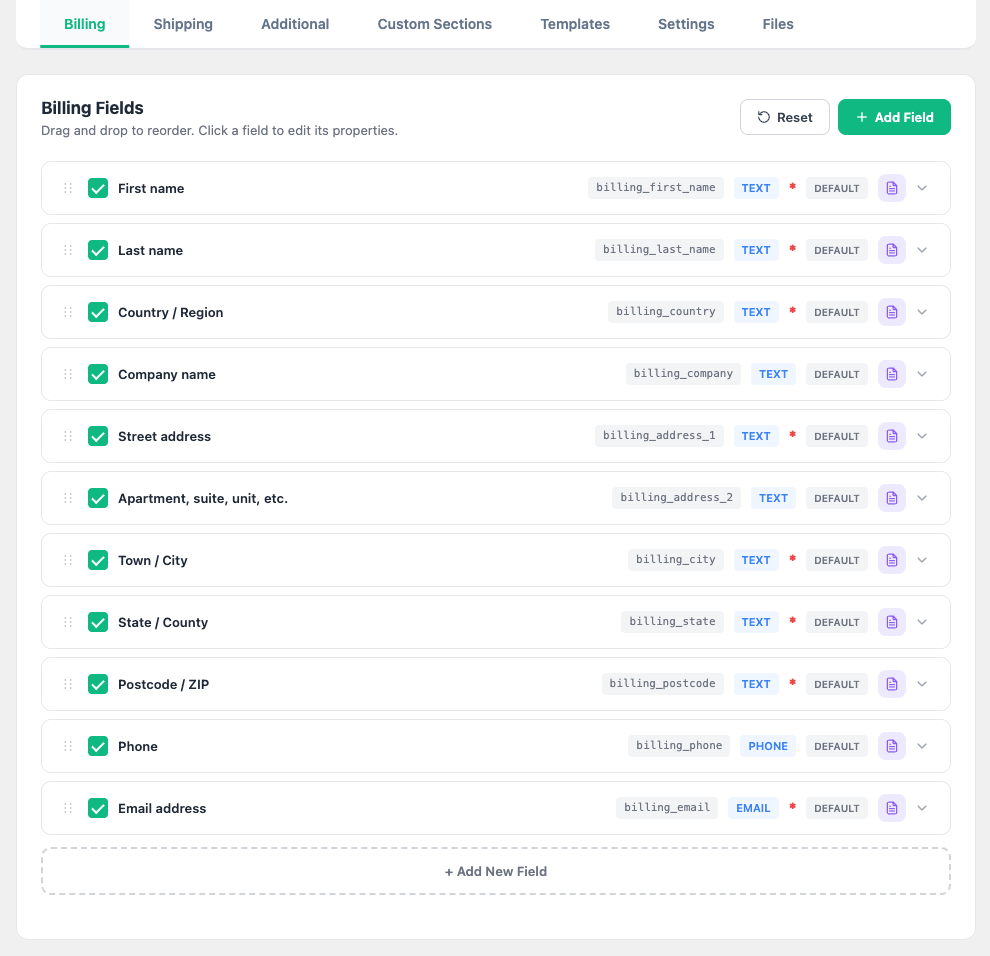
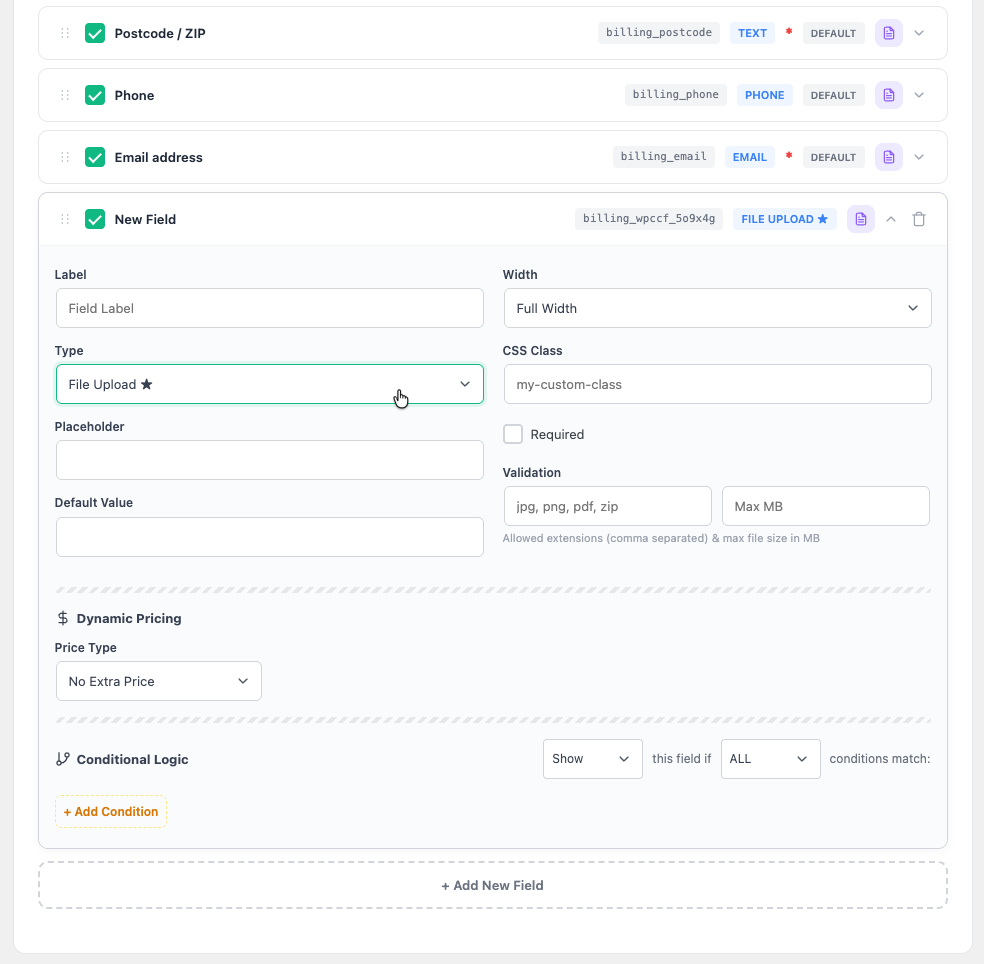
WPC Checkout Field Editor for WooCommerce gives you complete control over the WooCommerce checkout page. Add new custom fields, edit default fields, remove unnecessary ones, and rearrange them with an intuitive drag-and-drop interface — all without writing a single line of code.
Unlike basic checkout editors, this plugin brings advanced capabilities like conditional logic, dynamic pricing, custom sections, file uploads, and field templates — making it the most comprehensive checkout customization tool for WooCommerce.
Key Features
- Drag-and-drop field reordering for Billing, Shipping, and Additional fields
- 20+ field types: Text, Textarea, Select, Radio, Checkbox, Multi-checkbox, Date, Time, DateTime, Date Range, Color Picker, File Upload, Number, Email, URL, Password, Heading, Paragraph, and more
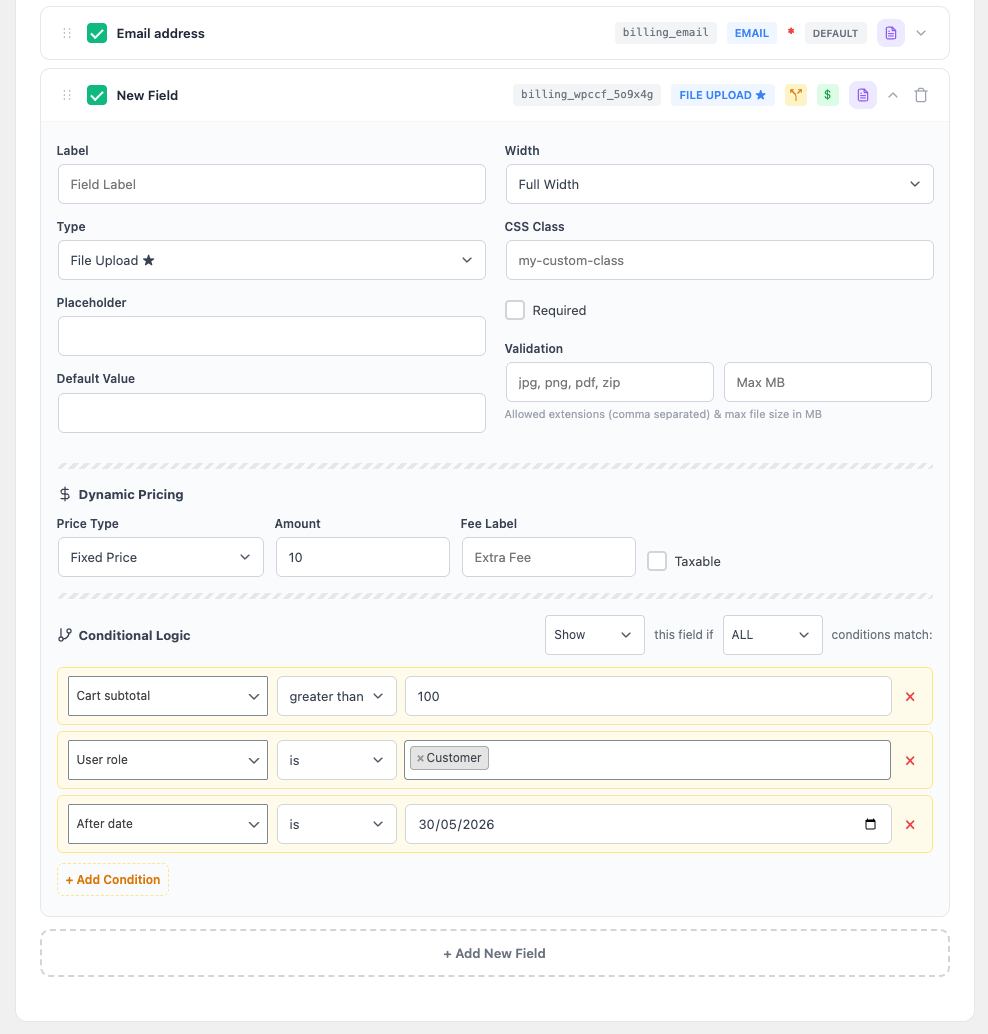
- Conditional logic: Show or hide fields based on payment method, shipping method, country, cart contents, and other field values
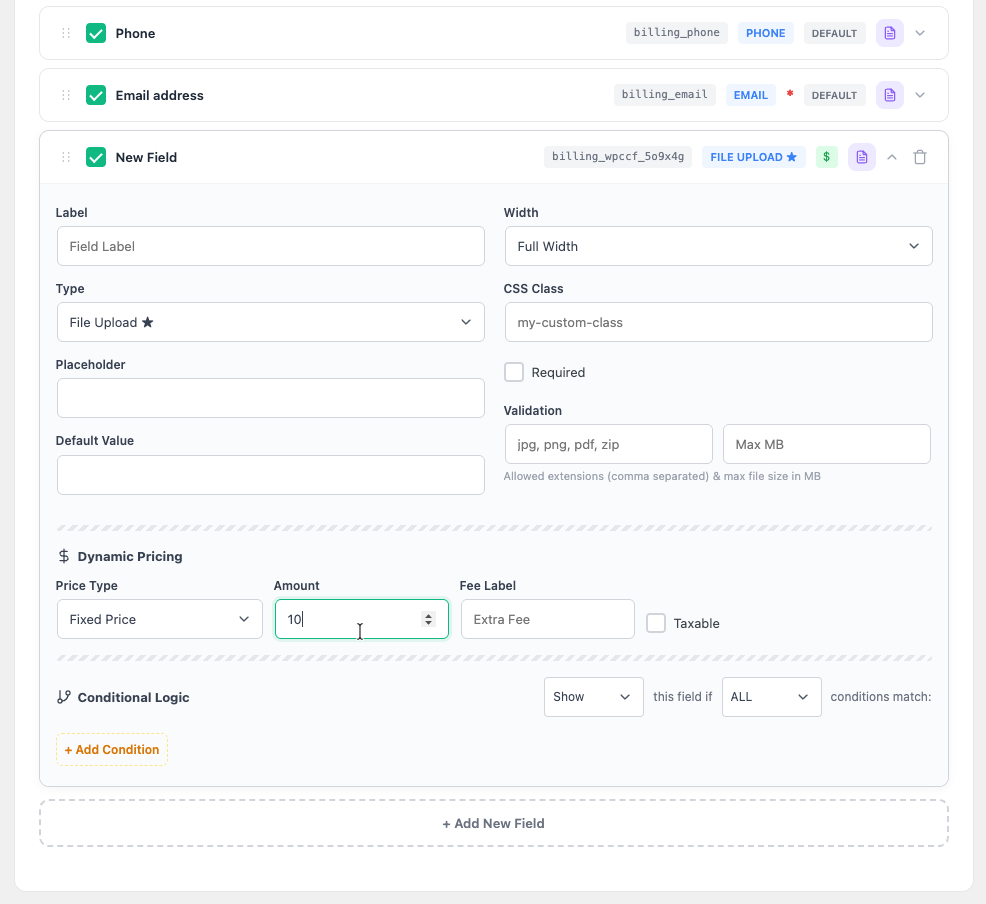
- Dynamic pricing: Add fees based on field values (fixed, percentage, per-character, per-line, per-unit, per-word)
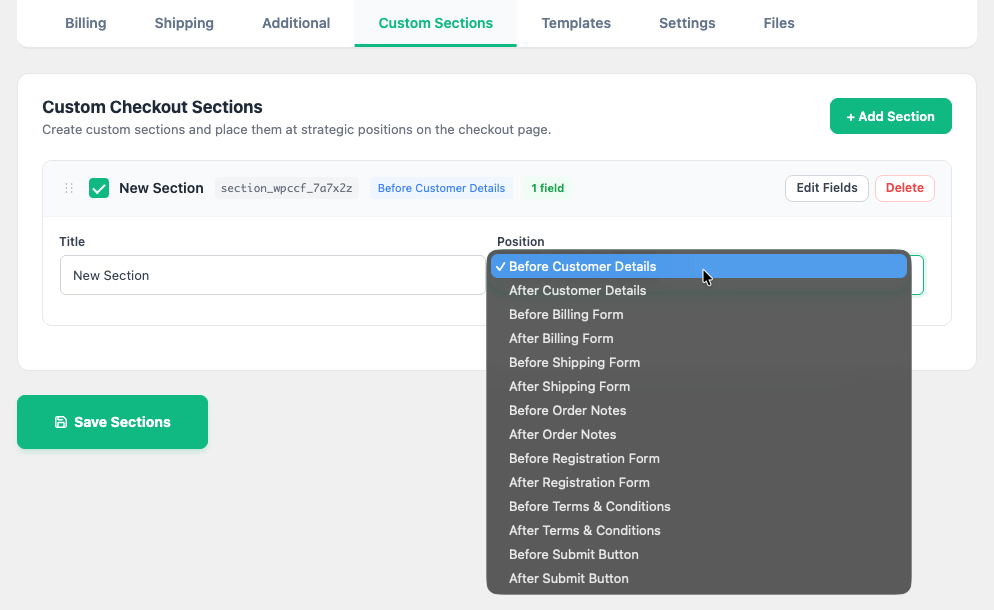
- Custom sections: Create new checkout sections at any position on the page
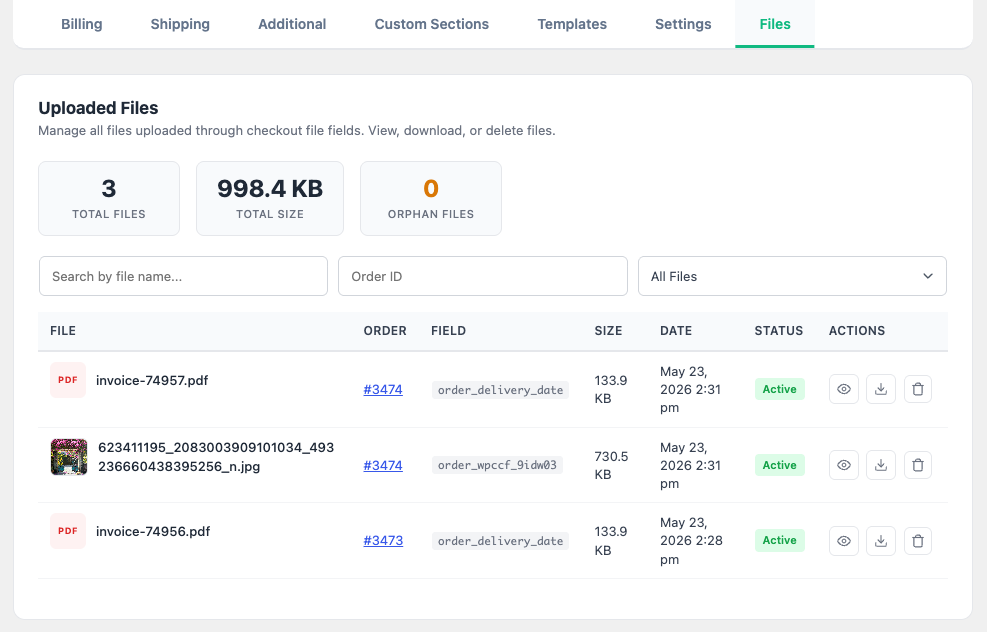
- File upload with secure storage and admin management
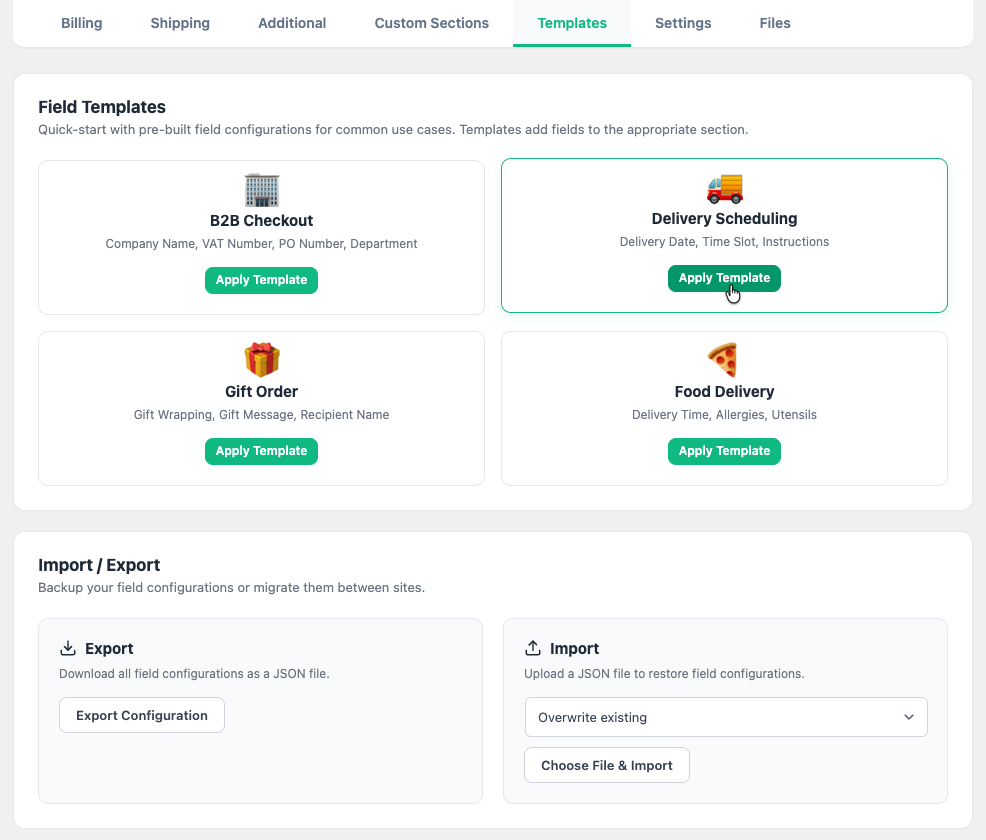
- Field templates: Pre-built sets you can apply in one click
- Import/Export: Migrate checkout configurations between sites via JSON
- Full Block Checkout (Checkout Block) compatibility
- Translation ready
✏️ Comprehensive Field Types
Go beyond simple text inputs. The plugin supports a wide variety of field types to capture exactly the data you need.
Input Fields
- Text, Textarea, Number, Email, URL, Password — standard inputs with full validation
- Select, Radio Button, Checkbox, Multi-checkbox — single and multiple choice options with customizable choices
- Heading, Paragraph — display-only elements for adding instructions or visual separators
Advanced Pickers
- Date Picker, Time Picker, DateTime Picker — powered by a clean, modern datepicker UI
- Date Range Picker — let customers select check-in/check-out dates, rental periods, etc.
- Color Picker — visual color selection with a native color input
File Upload
- Drag-and-drop upload zone with live image preview
- Per-field configuration: allowed file types, maximum file size
- Secure storage in protected directory with
.htaccessblocking direct access - Deferred upload — files are uploaded only when the customer places the order, preventing unnecessary server load
🧠 Powerful Conditional Logic
Show or hide fields dynamically based on the customer's selections and checkout context. Build intelligent, responsive checkout forms that adapt in real time.
Supported Conditions
- Payment Method — Show fields only for specific gateways (e.g., show "Bank Reference" only for Bank Transfer)
- Shipping Method — Display fields based on chosen shipping (e.g., show "Delivery Instructions" only for Local Delivery)
- Billing/Shipping Country — Target fields to specific countries or regions
- Other Checkout Fields — Chain fields together (e.g., show "Company VAT" only when "Customer Type" is "Business")
Logic Controls
- AND / OR relation — combine multiple conditions with "All must match" or "Any can match"
- Show When / Hide When — choose the action when conditions are met
- Equal / Not Equal comparison — flexible matching with wildcard support
💰 Dynamic Pricing & Fees
Automatically add fees to the order based on customer selections. Perfect for gift wrapping, rush processing, insurance, and other value-added services.
Pricing Types
- Fixed Amount — Add a flat fee (e.g., $5 for gift wrapping)
- Percentage — Calculate fee as a percentage of cart subtotal
- Per Character — Charge based on text length (e.g., engraving cost per letter)
- Per Line — Charge per line in textarea fields (e.g., custom message pricing)
- Per Unit — Multiply fee by a numeric field value (e.g., quantity-based add-on)
- Per Word — Charge based on word count
All fees are automatically displayed in the WooCommerce order review, emails, and admin order detail — with full tax support.
📂 Custom Checkout Sections
Break free from the standard Billing/Shipping/Additional layout. Create entirely new checkout sections and position them exactly where you want.
Available Positions
- Before/After Customer Details
- Before/After Billing Form
- Before/After Shipping Form
- Before/After Registration Form
- Before/After Order Notes
- Before/After Terms & Conditions
- Before/After Submit Button
Each section gets its own field editor tab, drag-and-drop ordering, and conditional logic — just like the built-in sections.
📁 Admin File Manager
Track every file uploaded through checkout in a dedicated admin dashboard.
- Overview Stats — Total files, total storage used, orphan count at a glance
- Search & Filter — Find files by name, order ID, or status (active vs. orphan)
- Thumbnail Preview — Image files display inline thumbnails via secure proxy
- Secure View/Download — Serve files through PHP proxy, bypassing
.htaccessprotection - One-click Delete — Remove files from both database and disk
- Orphan Detection — Files from abandoned checkouts are flagged and can be cleaned up
📋 Field Templates
Get started quickly with pre-built field sets covering common checkout scenarios.
- Gift & Personalization — Gift wrapping checkbox, gift message, recipient name
- Business / B2B — Company name, VAT number, purchase order number
- Delivery Preferences — Preferred date, time slot, delivery instructions
- Additional Info — "How did you hear about us?", special requests, order notes
Apply any template with one click. Templates merge with your existing fields — they never overwrite.
📦 Import / Export
Easily migrate checkout configurations between staging and production environments.
- Export all field configurations as a JSON file
- Import configurations from another site
- Perfect for development workflows and multi-site management
🔒 Security
Built with WordPress security best practices:
- Nonce verification on all AJAX endpoints
- Capability checks (
manage_woocommerce) on all admin operations - Rate limiting on guest file uploads (10 per IP per hour)
- Sanitized Content-Disposition headers to prevent injection
- File type whitelist enforcement on uploads
- Protected upload directory with
.htaccessblocking
💡 Common Use Cases
Below are real-world scenarios store owners commonly solve with this plugin.
Personalization & Gifting
1. Gift wrapping with fee
Add a "Gift Wrap" checkbox field with a $5 fixed fee. When checked, show a "Gift Message" textarea — the fee is automatically added to the order total.
2. Custom engraving
Add a text field for engraving text with per-character pricing ($0.50/char). Customers see the calculated fee update in real time.
3. Personalized products
Add fields for "Name to Print", "Font Style" (select), and "Color" (color picker) — all shown conditionally when "Add Personalization" checkbox is checked.
B2B & Business
4. Business checkout fields
Show "Company Name", "VAT Number", and "Purchase Order Number" only when "Customer Type" radio is set to "Business". Hide them for personal orders.
5. Tax exemption upload
Add a file upload field for tax exemption certificates, shown only when billing country equals your domestic market and customer type is "Business".
Delivery & Logistics
6. Delivery date and time slot
Add a date picker for preferred delivery date and a select dropdown for time slots (Morning, Afternoon, Evening). Show only for "Local Delivery" shipping method.
7. Delivery instructions for specific methods
Show a "Delivery Instructions" textarea only when the customer selects "Local Delivery" or "Same Day" shipping. Hide it for standard and express shipping.
8. Signature requirement for high-value orders
Add a "Require Signature" checkbox with a $3 fee, shown conditionally when cart total exceeds $200.
Marketing & Feedback
9. Referral tracking
Add a "How did you hear about us?" select field with options like Google, Facebook, Friend Referral, etc. Data is saved to order meta for analytics.
10. Special requests
Add a textarea for special requests, positioned in a custom section before the submit button with a heading "Anything else we should know?".
Country-Specific Fields
11. CPF for Brazil
Show a "CPF" text field only when billing country is Brazil. Mark it as required.
12. GSTIN for India
Show "GSTIN Number" only when billing country is India and customer type is "Business".
Combining Conditional Logic
The most powerful use cases combine multiple conditions:
- "Show gift options only for physical products shipped domestically" — Combine: Shipping Method = Flat Rate AND Shipping Country = US
- "Business fields for EU customers only" — Combine: Customer Type = Business AND Billing Country = any EU country
- "Rush processing fee only for express shipping" — Combine: Shipping Method = Express AND add a $15 fixed fee checkbox
Onetime purchase - Lifetime update
1-year premium support
7-Day Money-Back Guarantee
After successful payment, the installation file will be immediately sent to your purchase email.
If you have any pre-sale questions, feel free to contact us.
Related Downloads